
- Today
- Total
Notice
Recent Posts
Recent Comments
Link
250x250
프로그래밍 농장
Trello 라인 봇 알림을 위한 API key/token 발급방법 본문
728x90
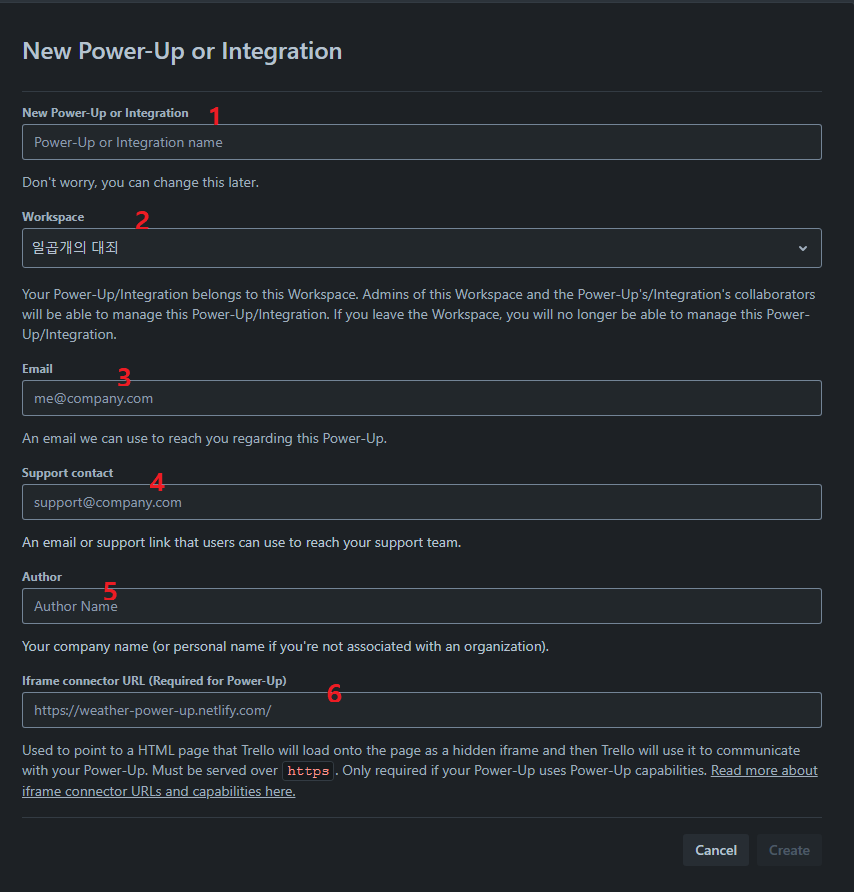
- Trello api key 발급을 위해 아래 링크접속 (작업자는 Admin 권한이 있어야함)
https://trello.com/power-ups/admin/new
- 아래의 순서에 맞추어 입력
- New Power-Up Integration name 입력 (ex. fnc_7sin ..)
- Workspace 선택
- Email : 작업중인 admin 당사자의 email
- support contact : 작업중인 admin 당사자의 email
- Author : 입력 (ex. f&c ..)
- Iframe connector URL : 그대로 두기
- create 클릭
- 생성된것 클릭하여 api key 확인가능
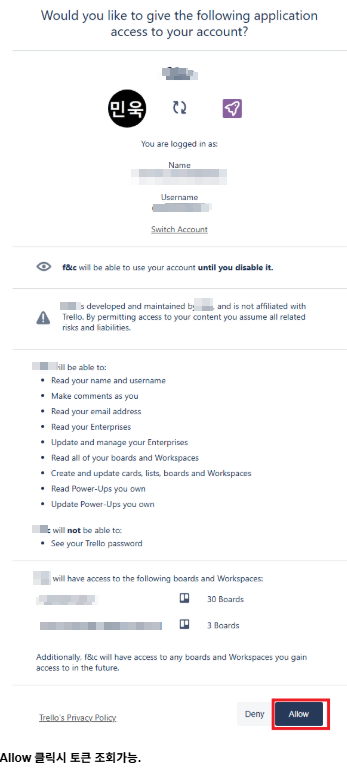
- Trello api token 발급을 위해 아래 링크접속 (작업자는 Admin 권한이 있어야함)
링크 맨뒤의 ${key} 부분에 위에서 발급한 key 입력후 접속
- Trello Board id 조회를 위한 작업 (작업자는 Admin 권한이 있어야함)
우측상단의 눈 아이콘 클릭후 Board id 확인

위의 작업을 통해 총 아래 4개의 trello board 에 대한 api key / api token / Board id 을 필요로 합니다.
+ 트렐로 플러그인 이슈 및 관련 포스트 참고
728x90